6 October 2021
The timeline gives your home's logbook a simple visual overview!
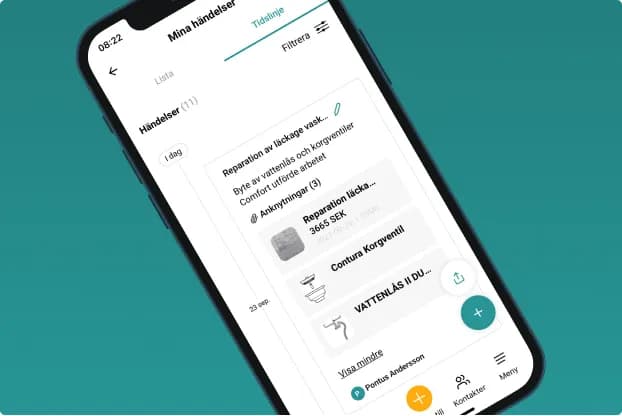
Who doesn't want a clear overview of the years gone by as well as the years ahead? The timeline is perfect for exactly that when it comes to your home's history! Who painted the living room, and when? When did we have that water leak? When was the chimney sweep last here? Planning the next project? You'll find the answer with a few taps of your fingertip!
The aim of the timeline is to make it super easy to get an overview of what has happened in your home and when, in chronological order. Everything you log in your home's ID also ends up on the timeline automatically, but you can also easily add your own events from the past, a way of building a more complete timeline without having all the documentation in place. You can easily link a document, receipt/invoice, product or photo to an event afterwards, and so create a complete home ID. The timeline also has filtering options, so you can choose which events you want shown on the timeline at any given time.
Pontus, our CEO, is of course a "heavy user" of the timeline - he's an orderly person and regularly uses the timeline to document his house in Rydebäck outside Helsingborg. Here he shares his best tips for getting started!
Small doses quickly give you full control.
"I have very little time to spare during the week, as work and family take up all my time. So I decided to add an event here and there in small doses, whenever a spontaneous moment came up. That way, within a week or so I'd built up a pretty good history going back in time. We're all different and you should do whatever suits you best, but I can promise you it's a great feeling when you've made some progress and realise what you've done in your home and, suddenly, best of all, that you're on top of the past, the present and the future."
You'll find the timeline under Timeline in the Menu, or via the quick navigation on the home screen. All events are saved automatically when you add something (a product, a receipt, a to-do and so on), but you can also add your own events, with or without documents.
Here's how;
- Tap the green + sign in the bottom right corner of the screen
- Name the event
- Save
You can now go back to the event at any time and add receipts, photos and more. If you have lots of events and want an overview, you can easily filter what you want to see in your timeline. Choose Filter and "turn off" the areas you don't want to see.
If you want to use the timeline in another way, you can export it to get a list of the items you want in PDF format. Here's how;
- Tap the "upload" icon above the green + sign.
- Choose which activities you want to export and generate the export.
- The file then lands in your message inbox, from where you can send it on wherever you like.
The way it should be in House:ID; On your terms - When you want - Everything at your fingertips
Questions about the timeline? Feel free to get in touch at info@houseid.se